Our verdict: Bubble.io is worth it in 2026 for founders and product teams building B2B SaaS, marketplaces, internal tools and AI-enabled web apps who need a working product in weeks, not quarters. It is the wrong choice for high-traffic consumer apps, real-time products such as gaming or streaming, HIPAA-regulated data, or any team that needs to export its source code.
Pricing is usage-based. Web plans cost $32, $134 and $399 a month on monthly billing, and the real cost driver is workload units, which climb with traffic and with poorly built workflows.
We are a Bubble Gold Partner and were named Bubble Agency of the Year 2024-25, with 300+ products shipped since 2022. This review covers what works, what breaks and what it costs, using lessons from our own client builds.
TL;DR: Bubble Review Summary
Criteria | Verdict |
Best Use Cases | Internal tools, MVPs, SaaS apps, complex web applications |
Learning Curve | Steep. While Bubble is a no-code tool, it requires significant time to master, especially for logic-heavy builds. |
Performance & Scale | Strong up to mid-scale. Optimization and planning are needed for larger apps. |
Native Mobile Support | Native iOS and Android apps can now be built alongside your web app, on Bubble's Mobile and Web & Mobile plans. |
Developer Handoff Ready | Yes, with structured builds. |
Pricing | Fair to start, but costs can spike with traffic or complexity. |
Overall | A powerful no-code platform for the right use cases. Bubble offers extensive educational resources, including click-by-click lessons, videos, and a user manual. |
Looking for a Bubble agency that actually ships? We have shipped 300+ products since 2022, are a Bubble Gold Partner, were named Bubble Agency of the Year 2024-25, and hold a 5.0 Clutch rating. See our Bubble development agency page or book a no-obligation call to scope your project.
What Is Bubble Really?
Bubble.io is a full-stack no-code platform for building complex web applications.
It combines front-end design, backend logic, workflows, database management, user authentication, and API integrations in one visual development environment.
That means a founder can use an experienced Bubble agency like Goodspeed to launch a functional SaaS MVP in weeks instead of months. But it also means performance, scalability, and architecture decisions matter early if you expect to scale to tens of thousands of users.
Here’s what that looks like in practice:
Drag-and-Drop UI Builder: Bubble’s visual editor lets you design complex, responsive UIs without writing HTML or CSS. The responsive design tools make it possible to create web apps that adapt across desktop and mobile screen sizes.
Workflow Engine: Logic and interactivity are built through Bubble’s workflow editor, allowing conditionals, database operations, and even scheduled backend events. You can create complex workflows with conditional logic, making it a genuinely powerful app development platform.
Integrated Database: Bubble comes with a built-in database that handles everything from dev/live environments to auto backups and role-based privacy rules. This is where Bubble’s data architecture shines for teams that want full control over their data layer.
API & Plugin Support: Whether you are connecting Stripe, OpenAI, or your own custom backend, Bubble’s API and plugin system makes integrations manageable, even without code. Its plugin marketplace adds deep extensibility for connecting to external services and third-party tools.
Scalability on AWS + Cloudflare: Bubble apps are hosted on enterprise-grade infrastructure with horizontal scaling in mind. Performance has improved significantly since 2023, though it is still not as fast as fully native code.
Web and Mobile Capable: While web apps are the core experience, Bubble now supports native mobile app builds via its native mobile builder (launched in 2025 and now sold as Mobile and Web & Mobile plans). This means you can build and publish native apps for iOS and Android directly from Bubble.
AI App Builder: A newer feature: Bubble’s AI assistant can scaffold an app for you based on a single prompt. It is not magic, but it is a decent head start for prototyping.
Common Misconceptions
“It’s only for MVPs”: Many production SaaS apps and internal tools run entirely on Bubble.
“No-code = no complexity”: Bubble can handle complex logic and backend logic, but it takes real effort and careful planning.
“You can’t build native apps”: That used to be true. Bubble launched its public beta for native mobile apps in 2025, which lets builders design, publish, and scale fully native applications for iOS and Android from the same platform.
The Good: Bubble Advantages
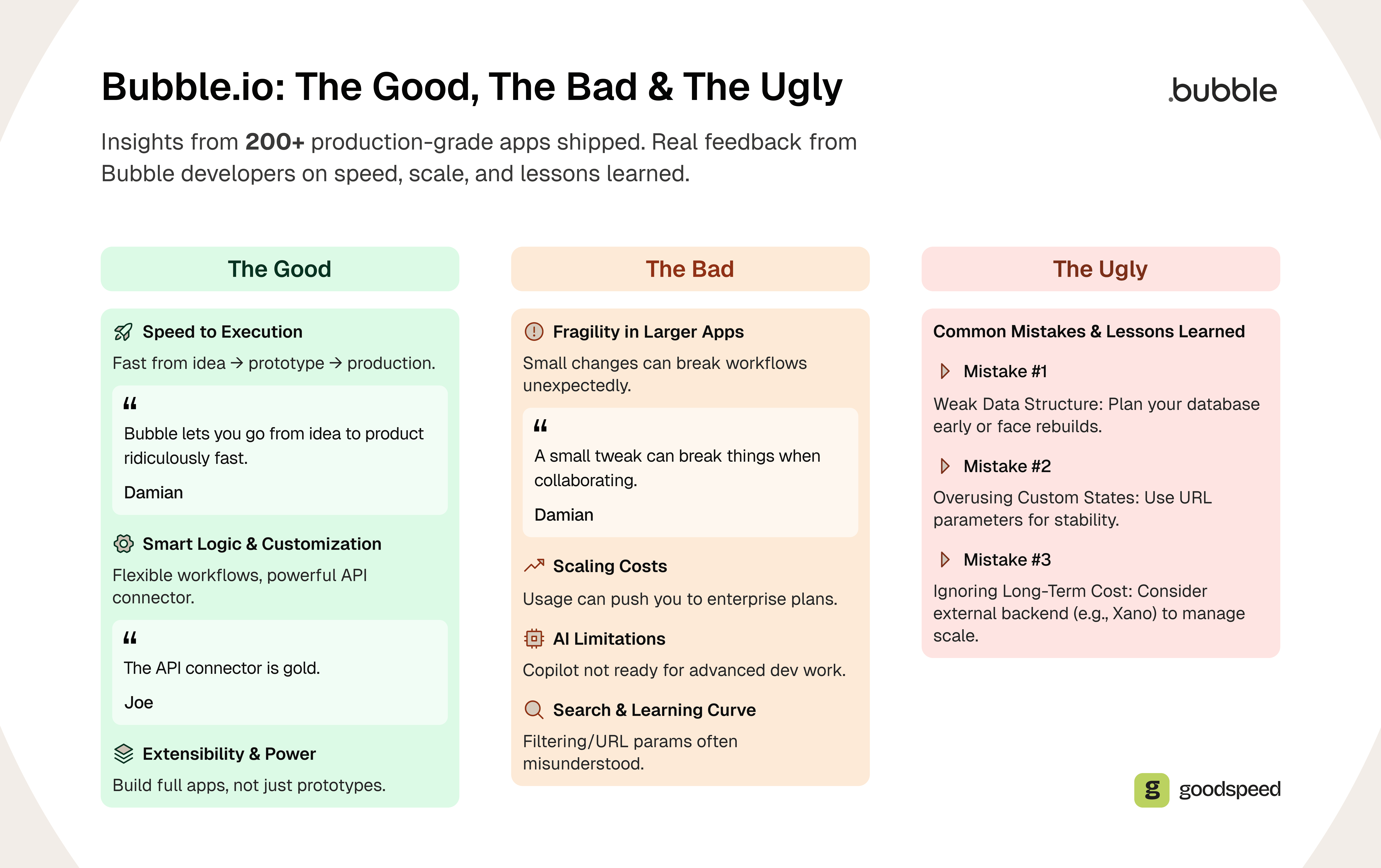
Speed to Execution
Bubble’s biggest strength is speed. You can go from idea to prototype to production-grade app faster than almost any other no-code tool. For founders validating an idea or teams that need to build a SaaS app quickly, this is a game-changer.
“Bubble lets you go from idea to working product ridiculously fast. The visual logic and database structure make it easy to prototype and scale in one place.”, Damian, Bubble Developer
“How fast we can bring ideas to life, that’s what makes me stick with Bubble.”, Ian, Bubble Developer
This is the real advantage of Bubble when it is used correctly: founders can validate and ship before spending months on traditional development. You will find recent client examples further down this review.
Smart Logic & Customization
For more advanced builders, Bubble becomes even more satisfying. The platform’s visual logic system allows users to map out how their app should behave in response to user actions or data changes. Instead of writing code, you define complex workflows visually, making it much easier to manage conditional logic and interactions.
“I really like to build with good practices. I get that dopamine hit when I figure out a smarter logic that avoids unnecessary steps.”, Ian, Bubble Developer

Work with us
Plan your app around your users
Discuss your product idea, essential workflows and platform requirements with our team.

Extensibility & Power
Bubble’s ability to act as a visual full-stack framework stands out. You are not just making prototypes. You are creating software that can serve customers or teams. A key feature is its extensive plugin ecosystem.
These plugins enable advanced customization and make it easy to connect with third-party APIs, allowing seamless integration with external services like Stripe, payment gateways, analytics tools, and automation platforms.
User Experience and Interface
Bubble stands out for its approachable, visual-first interface that empowers users to build web apps without ever touching a line of code.
The platform’s drag-and-drop editor is at the heart of the experience, letting you design layouts, set up database operations, and craft complex workflows with just a few clicks.
Responsive design is another strong suit. You can create apps that automatically adapt to different devices and screen sizes, which is critical for teams building internal tools or launching SaaS products.
If you are a founder with no coding experience or a product manager looking to prototype quickly, Bubble lets you create, iterate, and launch robust web applications without writing custom code.
The Bad: Bubble Limitations
Fragility in Larger Apps
As apps grow in complexity, so do the headaches. Small changes can create unexpected ripple effects across workflows, especially when multiple developers are collaborating on the same project.
“How small changes can unexpectedly break things that have wide, non-obvious consequences. Especially when collaborating. It can really slow you down.”, Damian, Bubble Developer
Scaling Comes at a Price
While early-stage pricing is approachable, successful apps can quickly blow through their workload units (WU) and get nudged toward enterprise plans. As your app gains traction, WU usage naturally rises. Bubble’s pricing model is scalable, allowing upgrades as the app grows, but costs can ramp up quickly with increased server capacity needs.
AI Limitations
Bubble’s AI features have not caught up with some other no-code tools yet. Copilot is helpful for templated actions but falls short on anything complex. It is promising for prototyping, but limited when it comes to real developer workflows.
“Bubble’s AI is so behind. It’s not ready to assist with real dev workflows yet.”, Ian, Bubble Developer
Search, Filtering, and Learning Curves
Bubble has a steep learning curve despite being a no-code platform, requiring significant time to master.
Filtering and searching are incredibly powerful features, but also misunderstood early on.
True beginners will take time to understand how to work with logic-based workflows, database connections, and privacy rules.
Users with prior experience in web design or development can get started faster, but building in Bubble still requires careful planning, especially regarding database structure and backend logic.
“Daisy chain filtering to combine multiple filters is a must-know. And URL parameters change the game. Rookie devs lean on custom states too much, which breaks with a simple refresh.”, Ian, Bubble Developer
Vendor Lock-In
One important trade-off to understand: Bubble applications are subject to vendor lock-in, as source code cannot be exported. If you ever decide to leave the platform, you would need a complete rebuild. This is not unique to Bubble, but it is worth factoring into your long-term cost and strategy planning.
The Ugly: Mistakes and Lessons Learned
Mistake #1: Weak Data Structure
“Early on, I didn’t plan the database structure carefully and had to rebuild large parts later. Now I treat data architecture like code: Plan first, build second.”, Damian, Bubble Developer
Mistake #2: Going All-In on Custom States
“In the rookie months, I used custom states everywhere. Then I realized a simple page refresh could break the logic. URL parameters changed the game.”, Ian, Bubble Developer
Mistake #3: Ignoring Long-Term Cost
Our takeaway: Building in Bubble is a long game. Learn its quirks early, respect its logic rules, and you will save yourself major rebuilds. If you want guidance on getting this right from day one, our Signal Sprint discovery workshops are designed to scope your project properly before a single element is placed on the page.
If you want to avoid these mistakes from day one, let’s talk through your architecture before you build.
Book a free consulting call with Goodspeed
Work with us
Build the right foundations for your app
Talk through your data, integrations and development scope with Goodspeed before you build.
Bubble Features Review
Speed & Scalability
2026 Performance: Significantly improved vs. pre-2023. Still, not as fast as native code.
Workload Units (WU): Every DB write, logic run, or API call consumes WUs. This is the core metric to monitor as your app scales.
Plan allowances: Starter includes 175K WU/month, Growth 250K and Team 500K. Whether that covers your app depends far more on how efficiently its workflows and searches are built than on user count alone.
Security & Compliance
Bubble has powerful privacy rules but relies on developers to configure them properly. Is Bubble safe to use? Yes, when privacy rules and security best practices are implemented correctly.
No built-in HIPAA compliance, making Bubble unsuitable for applications that must store sensitive healthcare data.
Integration & Automation
API Connector: Robust, handles OAuth, GraphQL, REST. Connects to virtually any external service.
Webhooks: Can listen and trigger workflows based on external events.
Workflows: Conditional logic, DB writes, backend triggers, scheduled tasks, and real-time updates.
Bubble.io Pricing in 2026
Bubble’s pricing is simple to start with, but long-term costs depend on how your app is built and used. Below are the current web app plans on monthly billing, as listed on bubble.io/pricing in October 2026. Visit our Bubble pricing guide for a full breakdown, including mobile and web + mobile tiers.
Plan | Monthly Price | Workload Units |
Free | $0 | 50K WU/month |
Starter | $32/month | 175K WU/month |
Growth | $134/month | 250K WU/month |
Team | $399/month | 500K WU/month |
Enterprise | Custom | Custom |
Annual billing saves up to 20%, which brings Starter down to $29/month, Growth to $119 and Team to $349. Mobile-only plans start at $49/month and Web & Mobile plans at $69/month on monthly billing ($42 and $59 billed annually). With good planning, Bubble can remain affordable as your app grows.
Costs can ramp up quickly if your app gains traction and requires more server capacity or integrations, so it pays to audit your workload usage regularly.
If you’re unsure how many workload units your product will need, we can model it with you before you commit.
Book a free consulting call with Goodspeed
Support and Resources
Bubble offers a comprehensive ecosystem of support to help users succeed at every stage of app development.
The platform provides a free plan for those just getting started, with paid plans unlocking additional features and higher usage limits as your app grows. One of Bubble’s biggest strengths is its active community.
Developers and users regularly share tips, answer questions, and provide feedback through forums, tutorials, and live webinars. Bubble also has a robust forum with active users who share tips and hacks related to using the no-code tool.
The platform offers detailed documentation covering everything from basic app setup to advanced backend logic and conditional logic.
If you need to connect your app to external tools or third-party services (like payment gateways, analytics, or automation platforms), Bubble makes integration straightforward with its plugin marketplace and robust API support.
Bubble also offers many educational resources, including click-by-click lessons, videos, and a user manual on its website. For those with limited coding experience, these resources are a sensible first step before you commit to a build.
What Makes a Good Bubble Build?
After delivering 300+ projects, here is what we have found separates clean, scalable Bubble apps from the ones that fall apart:
Scoped Workflows: Keep logic modular. Do not let a single workflow try to handle everything.
Privacy Rules: Set them before user testing. Not after.
Reusable Elements: Build component libraries the same way you would in any frontend framework.
External Services: Offload compute-heavy or high-volume workflows to tools like Xano or Make.
Database Planning: Building a scalable Bubble app requires making the right decisions early. Treat your data architecture as the foundation, not an afterthought.
Outgrowing Bubble? If workload unit costs, performance or lock-in are the problem, our Bubble to Code service moves your app to a coded stack you own.
Bubble in Production: Three Recent Client Builds
A review is only as useful as the builds behind it. Three of our 2026 Bubble projects show where the platform holds up and what it takes to get there.
Ambit: a community app that had to be ready for Grand Old Day, a St. Paul street festival that draws nearly 250,000 people. We shipped a progressive web app with an interactive map, lineups and set-time notifications in 10 weeks, and attendees signed up during the event itself.
MyAskAI: an AI startup whose Bubble platform was burning CPU and slowing its APIs as it scaled. In three weeks we tuned the heaviest pages and rebuilt the API layer around caching and sharper queries. Costs dropped by half, without a rebuild.
Vela: a social travel app that launched as a web app and an iOS app from the same Bubble build, with AI tagging every place users add at 98% accuracy in beta.
The pattern across all three: Bubble performs when the data structure and workflows are planned for the real load from day one, and gets expensive when they are not.
Weighing Bubble for your next build? Our Bubble development team can tell you in one call whether Bubble fits your product, roughly how much workload your app will use and what a build would cost. Bubble builds start from $5k and typically run $10k to $50k+ depending on scope.
Work with us
Turn your app plans into a clear next step
Bring your priorities, budget and existing product. We can help scope the build and what comes after launch.
Who Should (and Shouldn’t) Use Bubble?
Bubble Is a Good Fit For:
Founders validating an idea with a functional MVP
Internal tools, custom dashboards and business automation
Web apps with complex logic but manageable scale
SaaS platforms that need a full-stack no-code solution
Projects with specific needs that can be tailored through Bubble’s extensive customization options
Bubble Is Not Ideal For:
Apps requiring high-speed real-time features (e.g., gaming, streaming)
HIPAA/FedRAMP-compliant enterprise builds
Projects where vendor lock-in is a dealbreaker and full control over source code is required
Bubble vs. Glide: Which No-Code Platform Fits Your Project?
We get asked this question constantly: Is Glide or Bubble better? The honest answer is that they serve different purposes.
Glide is built for speed and simplicity. It converts spreadsheet data (Google Sheets, Airtable, Excel) into functional apps quickly, making it ideal for internal tools and lightweight data-driven applications. If you need something live in days rather than weeks, Glide is hard to beat.
Bubble is built for depth and control. It gives you a full-stack development environment with a relational database, complex workflows, API integrations, and granular UI customization.
If you are building a customer-facing SaaS product, a marketplace, or anything that requires custom logic, Bubble is the stronger platform.
The short version: choose Glide for simple, data-first internal apps.
Choose Bubble when your project demands the kind of depth, scale, and customization that no-code platforms are built for.
If you are not sure which direction is right, talk to our team. We have built extensively on both and can advise based on your specific needs.
The Direction of Bubble in 2026
Native Mobile: Bubble launched its native mobile builder in 2025 and now sells Web, Mobile and Web & Mobile plans. It is newer than the web editor, so check that the mobile features and plugins you need are supported before you commit.
AI Copilot: Promising for prototyping and scaffolding basic app structures, but still limited compared to other no-code tools for complex workflows.
Projects Architecture: Bubble has introduced a project-based structure that unifies web and mobile apps under one backend, reducing duplicate work and simplifying multi-platform development.
Book a free consulting call with Goodspeed
What You Can Build With Bubble, by App Type
Most Bubble projects fall into a handful of app types. Each one leans on the same core strengths (the database, search and filtering, workflows and the API Connector), but each has its own feature checklist and its own point where it starts to strain.
Marketplaces
Core features: user profiles with order history, search and filters, a payment provider such as Stripe, and buyer to seller messaging.
Trade-off: marketplace-specific platforms can get a standard marketplace live sooner, but they lock you into their structure. Bubble takes longer to set up and lets you design the exact transaction flow that gives buyers and sellers a reason to stay on the platform.
Internal Tools and Dashboards
Core features: an analytics view, API connections to the tools you already use, and role-based permissions so different staff see different data.
Watch for: some automations are easier to run outside Bubble in a tool like Zapier or Make, with Bubble as the interface.
Job Boards and Directories
Core features: listings with search and filters, editable profiles for candidates or businesses, and an admin view to approve listings or applicants.
Watch for: directories usually depend on organic search for growth. Getting large numbers of listing pages indexed and well structured takes more deliberate work on Bubble than on a content-first platform, so plan SEO before you build.
Social and Community Apps
Core features: profiles, feeds, messaging and content search.
Watch for: high-volume real-time messaging is where many teams move part of the workload to an external backend. Most social products are mobile-first, so check what the native mobile builder supports today before committing.
Build Habits That Keep Bubble Apps Maintainable
Beyond data structure and privacy rules, a few habits make the difference between an app a new developer can pick up and one nobody wants to touch:
Use styles, not per-element formatting. Set fonts, colors and spacing through styles so a design change happens in one place.
Standardize sizes. Agree a page width and a small set of padding and element sizes before building screens.
Name everything descriptively. Elements, workflows and data types should say what they do. Avoid cryptic abbreviations, because Bubble apps are hard to search without clear names.
Decide your page model early. Separate pages are simpler to reason about. Several screens on one page, shown and hidden conditionally, switch faster but get harder to maintain as the app grows.
Avoid repeating groups nested inside repeating groups, and move heavy logic into backend workflows.
Test with a few real users before adding features. A small MVP with five testers teaches you more than a full build launched without feedback.
Document as you go. Keep a short record of data types, key workflows and integrations so handover does not depend on one person's memory.
Extra Checks for Larger Organizations
Enterprise teams should confirm centralized user management, point-in-time backups, a branching and release process, and the compliance documentation their security team needs. Bubble publishes its compliance position, so check the current details against your requirements rather than assuming.
Is Bubble Worth It? Our Final Verdict
Bubble is worth it when you need a production web app in weeks, your product logic is complex, and you can accept that your app lives on Bubble's platform. It is not worth it if you need real-time performance at consumer scale, regulated health data, or code you can take elsewhere.
In our experience, most Bubble problems trace back to early decisions: a weak data structure, workflows that run more often than they need to, and privacy rules added late. Get those right and the platform holds up, as our work with Ambit, MyAskAI and Vela shows.
We are a Bubble Gold Partner, were named Bubble Agency of the Year 2024-25, hold a 5.0 rating on Clutch and have shipped 300+ products since 2022. If you want a straight answer on whether Bubble fits your product, talk to our Bubble developers. We will tell you if Bubble is the wrong tool.
Frequently asked questions
What is Bubble.io good for?
Is Bubble.io safe to use?
Is Bubble.io reliable?
Is Glide or Bubble better?
Is Bubble good for building an app?
Is Bubble.io completely free?
What are the main disadvantages of Bubble?
Can you build a mobile app with Bubble?

Harish Malhi
Founder of Goodspeed
Harish Malhi is the founder of Goodspeed. He left Google in 2019 to build his own product, and started Goodspeed to give other founders the same head start. Today the studio designs and builds websites and the whole digital experience around them for funded tech companies, at the moments that matter: a raise, a launch, a press cycle. Goodspeed is a Framer Enterprise Expert, was Bubble’s Agency of the Year in 2024, and has shipped 300+ products, including launch pages for an NVIDIA-backed AI lab and a Webby-nominated site for a Boeing-backed aviation company. It holds a 5.0 rating from 46 reviews on Clutch.